

Get Started Today! 708-781-7110

Preferred Blog
Preferred has been serving the Tinley Park area since 1991, providing IT Support such as technical helpdesk support, computer support, and consulting to small and medium-sized businesses.
Tip of the Week: View Your Current Google Sessions for Optimal Security
 Logging into an account only to find out that you’ve been hacked can be a real hassle. If you’re wondering why and how this could have happened, you’re in luck; some accounts, like Google, record when and how the account is accessed, and finding out how is as easy as checking out your security settings. Here’s how you can see who is accessing your account, and how.
The first step is to sign into your Google account. Hopefully, whoever is tampering with your account hasn’t changed your password on you. Click the grid-like icon in the top right corner of the screen that appears right next to your account name. Click on My Account.
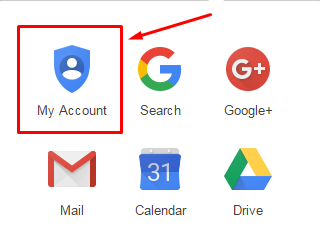
This is the central location of all things related to the settings of your Google account. Click on Sign-in & security.
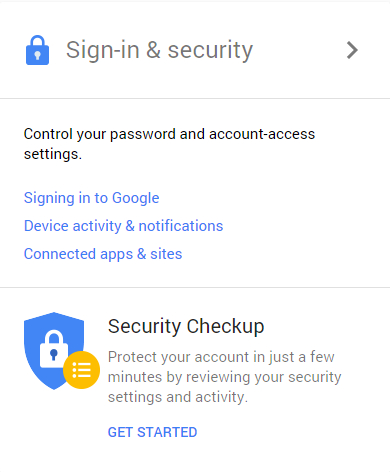
Next, you can scroll down to the Device activity & notifications section, or select it in the table of contents that appears in the left sidebar. This will show you which devices were last used to access your account.
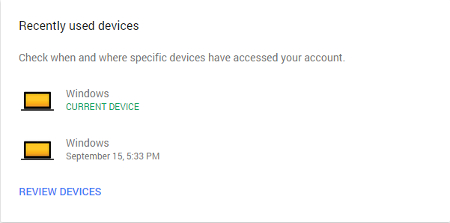
Now, all you have to do is click on Review Devices. This selection shows you what’s going on in your account, including approximate locations for where your account was accessed, the browser they used, and the country. This powerful tool for your Google account security is very simple to use and can effectively help you keep strangers from causing too much trouble.
If you notice that there’s some unsavory activity going on, you should reset your password immediately and set up security notifications that inform you when a hacker or other malicious entity tries to sign into your account. The ability to review devices that are accessing your account gives you the chance to review your account’s security policies and take greater precautions against attacks.
Your Google account also has a ton of other great security features available, with some of the most important ones being two-step verification, recovery options, password resetting, and application settings. Take the time to go through each of these options and optimize your security settings to mitigate the possibility of any future hacking activity.
For more tips on how to keep your online accounts secure, subscribe to Preferred’s blog.
About the author

Sign Up for Our Newsletter
Mobile? Grab this Article!

Latest Blog Entry
When I talk with business owners about their IT challenges, the conversation often starts with what’s broken: the outage that halted operations, the cybersecurity scare that rattled the team, or the systems that can’t keep up with growth. Those moments feel urgent because th...
Latest News
Preferred Communication Systems Acquires Business System Solutions’ Grand Rapids Operations, Expanding Midwest Footprint
GRAND RAPIDS, MI, UNITED STATES, December 3, 2025 -- Preferred Communication Systems (Preferred), a leading provider of Managed IT and Cybersecurity services headquartered in Chicago, Illinois, proudly announced the acquisition of Business System Solutions’ (BSS) Grand Rapids location.
This strategic acquisition enhances Preferred’s presence in the Midwest and strengthens its commitment to helping small and mid-sized businesses achieve peace of mind and a better bottom line through technology.
Copyright
Preferred. All Rights Reserved. Privacy Policy


Comments